Telemetry with Application Insights#
Let's add distributed tracing to observe how requests flow through our code.
Trace Decorator#
Add to src/appinsight/logger.py:
import inspect
from functools import wraps
from opencensus.trace import execution_context
from opencensus.trace.tracer import Tracer

def trace_as_dependency(tracer: Tracer = None, name: str = None, prefix: str = None):
    """Decorator to trace method invocations as dependencies in App Insights."""

    def inner_function(method):
        @wraps(method)
        def wrapper(*args, **kwargs):
            file_name = inspect.getfile(method).split("/")[-1].split(".py")[0]
            trace_name = name if name else method.__name__
            trace_name = f"{file_name}.{trace_name}"
            if prefix:
                trace_name = f"{prefix}.{trace_name}"

            oc_tracer = tracer or execution_context.get_opencensus_tracer()

            if oc_tracer:
                with oc_tracer.span(trace_name):
                    return method(*args, **kwargs)
            return method(*args, **kwargs)
        return wrapper
    return inner_function

def get_opencensus_tracer() -> Tracer:
    return execution_context.get_opencensus_tracer()
Initialize Telemetry#
In functiondemo/__init__.py:
from opencensus.extension.azure.functions import OpenCensusExtension
from src.appinsight.logger import AI_CONNECTION_STRING, callback_add_role_name

# Configure OpenCensus for Azure Function
OpenCensusExtension.configure(connection_string=AI_CONNECTION_STRING)
OpenCensusExtension._exporter.add_telemetry_processor(callback_add_role_name)
Using the Tracer#
As Decorator#
from src.appinsight.logger import trace_as_dependency

@trace_as_dependency(name="entrypoint")
def main(req: func.HttpRequest, context: func.Context) -> func.HttpResponse:
    ...
As Context Manager#
from src.appinsight.logger import trace_as_dependency, get_opencensus_tracer

@app.route("/health", methods=['GET'])
@trace_as_dependency(name="health")
def health():
    tracer = get_opencensus_tracer()

    with tracer.span('get_linkedin.com'):
        res = requests.get("https://www.linkedin.com", timeout=10)
        return jsonify(message="OK" if res.ok else "Failed"), res.status_code
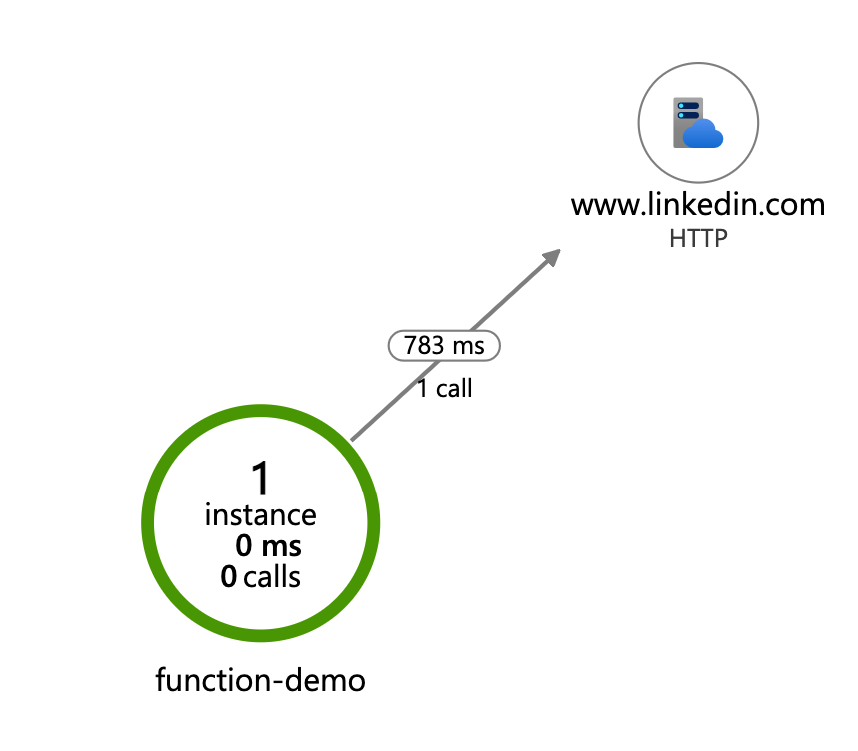
Application Map#
View the distributed trace in App Insights:
Reading Traces#
Drill down into individual requests:

Complete Observability Architecture#
flowchart TD
    subgraph Client
        A[Browser/API Client]
    end

    subgraph Azure Function
        B[HTTP Trigger]
        C[Flask App]
        D[OpenCensus Tracer]
        E[AzureLogHandler]
    end

    subgraph Application Insights
        F[Transaction Search]
        G[Application Map]
        H[Live Metrics]
        I[Alerts]
    end

    A --> B
    B --> C
    C --> D
    C --> E
    D --> F
    D --> G
    E --> F
    F --> I
    G --> H
Summary#
In this tutorial series, you learned to:
- ✅ Set up Azure Functions environment
- ✅ Create and deploy a Function App
- ✅ Integrate Flask framework
- ✅ Implement OAuth2 authentication
- ✅ Add centralized logging
- ✅ Configure distributed tracing
Source Code#
Complete code: yks0000/az-function-tutorial
🎉 Congratulations! You've completed the Azure Functions Tutorial Series!