Accessing Protected API#
To access protected APIs, we need to obtain an access token from Azure AD.
OAuth2 Flow#
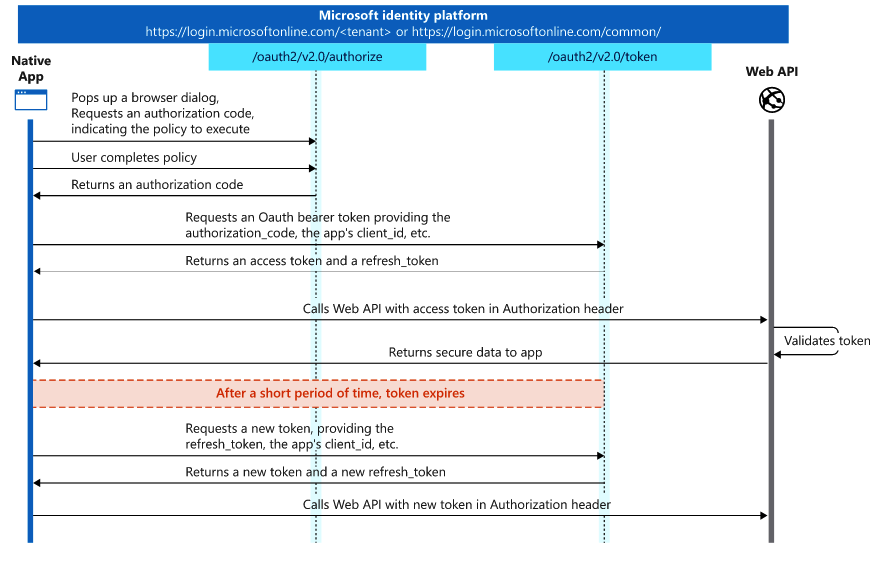
The complete OAuth2 auth code flow is documented in Microsoft's official docs.
Generate Client Credentials#
- In Azure Portal, go to your AD App:
functiondemo-ad-server-app - Navigate to Certificates & secrets tab
- Create a new client secret
Note
In production, users create their own Client AD App which you onboard to your Server AD App with required scopes.
Get Access Token#
Set environment variables:
export TENANT_ID="xxxxxxx-353f-xxxxxxx-be76-xxxxxx"
export GRANT_TYPE="client_credentials"
export CLIENT_ID="xxxxx-47cd-xxxxxxx-a16e-xxxxxx"
export SCOPE="api://$CLIENT_ID/.default"
Request the token:
read -p "Enter Client Secret: " CLIENT_SECRET

curl --location --request POST \
  "https://login.microsoftonline.com/$TENANT_ID/oauth2/v2.0/token" \
  --header "Content-Type: application/x-www-form-urlencoded" \
  --data-urlencode "grant_type=$GRANT_TYPE" \
  --data-urlencode "client_id=$CLIENT_ID" \
  --data-urlencode "client_secret=$CLIENT_SECRET" \
  --data-urlencode "scope=$SCOPE" | jq .
The response contains an access token valid for 1 hour.
Use the Token#
Local Testing#
curl --location --request GET 'http://localhost:7071/vault?secret=name' \
  --header 'Authorization: Bearer <YOUR_ACCESS_TOKEN>'
Production#
curl --location --request GET \
  'https://function-demo.azurewebsites.net/vault?secret=name' \
  --header 'Authorization: Bearer <YOUR_ACCESS_TOKEN>'
Token Validation Flow#
flowchart TD
    A[Receive Request] --> B{Has Auth Header?}
    B -->|No| C[Return 401]
    B -->|Yes| D[Extract Token]
    D --> E{Valid JWT?}
    E -->|No| C
    E -->|Yes| F{Token Expired?}
    F -->|Yes| C
    F -->|No| G{Has Required Role?}
    G -->|No| H[Return 403]
    G -->|Yes| I[Process Request]
    I --> J[Return Response]