Setting up Environment#
Let's set up our development environment for Azure Functions.
Browser Setup#
- Login to Azure Portal with your account
- Select your subscription (e.g.,
Visual Studio Enterprise Subscription) - Create a new Resource Group:
- Name:
az-func-demo-wus - Region:
West US
- Name:
Azure CLI Setup#
- Authenticate the
azCLI:
az login
- Set your subscription:
az account set --subscription xxx-0fc2-xxxxx-9342-xxxxxxx
GitHub Repository#
Create a GitHub repo for your code:
- Go to github.com/new
- Create a public repository named
az-function-tutorial - Clone and initialize:
echo "# az-function-demo" >> README.md
git init
git add README.md
git commit -m "first commit"
git branch -M master
git remote add origin https://github.com/yks0000/az-function-tutorial.git
git push -u origin master
VS Code Configuration#
-
Open VS Code and navigate to your cloned repository
-
Install the following extensions:
- Azure CLI Tools
- Azure Functions
- Azure Resources
- Azure Account
- Python
-
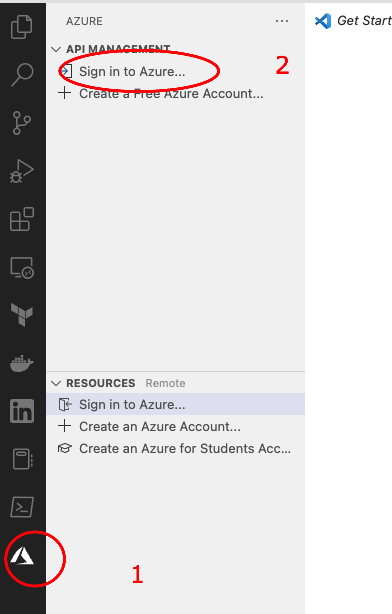
Login to your Azure account in VS Code: